
Frequently Asked Questions

Everything about pricing, artwork, printing and delivery. If your question is not here, WhatsApp is the fastest way to reach us.

The price you see is the price you pay

Nothing is added after you order. Extra work is quoted first.

You don’t fix your own file

We check it, and text edits are free.

What you design in the BCMY Designer is what prints

Or send your own file — we print exactly what you send, and check it first.

The lead time we show you is the lead time you get

Met on 95% of orders.

Nothing prints until you approve it

Digital proof by email, or approval at checkout in the Designer.

Jump to a topic

6 questions
Prices, add-ons and what is included.
8 questions
Templates, bleed, outlines, QR codes.
10 questions
Paying, receipts, cancellations, credit terms.
6 questions
Shipping cost, timing and collection.
2 questions
Software, colour mode, resolution.
3 questions
Our eco, thickness and water-resistance ratings.
8 questions
Methods, formats, quantities, turnaround.
5 questions
Foil, emboss, edge colour, Spot UV.
2 questions
Our design service and how it works.
3 questions
Reorder, change address, change details.

Costs & Pricing

Will the price change after I place my order?

No. The total you see when you configure your card is the full price, and it does not change after you order. Nothing is added after you have ordered.

Will you charge extra for artwork?

Text editing is free on an editable file — a name, job title, phone number or email change.

If the file you send cannot be edited — a flat image, a JPG screenshot, or a PDF — we cannot change the text on it. Recreating the artwork from scratch is a separate job, so we will tell you and quote it before doing anything.

Send an editable file and this never comes up.

What is the difference between a text edit and a design change?

A text edit changes what is written — a name, title, phone number or email. This is free on an editable file, and usually done the same day.

A design change changes how the card is laid out — moving elements, resizing, a new composition. That is design work rather than a correction, so we quote it before starting. If it is a substantial redesign, our design service is usually the better route.

Are there any hidden charges?

Optional add-ons — such as round corner or additional finishing — are priced as you select them while configuring your card. There is no separate artwork fee, setup fee or plate fee added afterwards.

Is the BCMY Designer free to use?

Yes. Building your card in the BCMY Designer costs nothing, and the price updates as you change specification.

What is the minimum order quantity, and can I order less?

Minimums vary by product. Most business cards are 200 pcs per name per design, while selected products start from 100 pcs. Business cards are printed offset, where a fixed setup cost applies to every job; at higher quantities that cost is spread thinner and the per-card price drops.

Please check the available quantity options on the product page for your chosen stock and finish. If you need a smaller run, contact us and we will tell you honestly whether it is worth it.

Design & Artwork

Where can I download business card templates?

We offer hassle-free templates and guidelines to help you create your artwork. Below are links to our blank templates in different formats for standard business cards (89mm x 54mm, with a bleed size of 92mm x 57mm).

If you require a different size, you can adjust the template accordingly. Examples include:

  • 85mm x 54mm (bleed size: 88mm x 57mm)
  • 89mm x 50mm (bleed size: 92mm x 53mm)
  • 85mm x 50mm (bleed size: 88mm x 53mm)
  • 54mm x 54mm (bleed size: 57mm x 57mm)
  • 40mm x 40mm (bleed size: 43mm x 43mm)

*Note: Please outline all text and embed images before submitting your artwork/design file
Download Ai file
Download Psd file
Download Pdf file
Download Jpg file
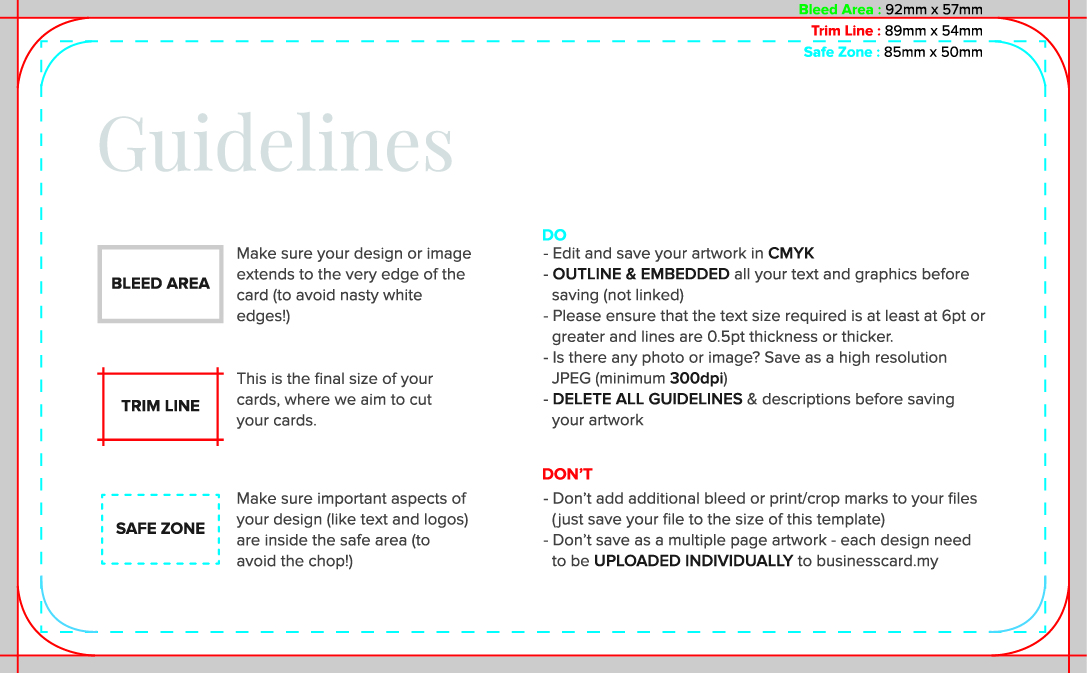
What are the bleed, trim and safe areas?

The bleed is the portion of your design that will be trimmed off when the card is cut to its final size. It ensures that your design or image extends to the very edge of the card, preventing any unsightly white borders. If you’re designing your cards before uploading, make sure your artwork is set to ‘Full Bleed’ size. You can find a list of recommended ‘Full Bleed’ sizes or choose from our range of templates available for every product.
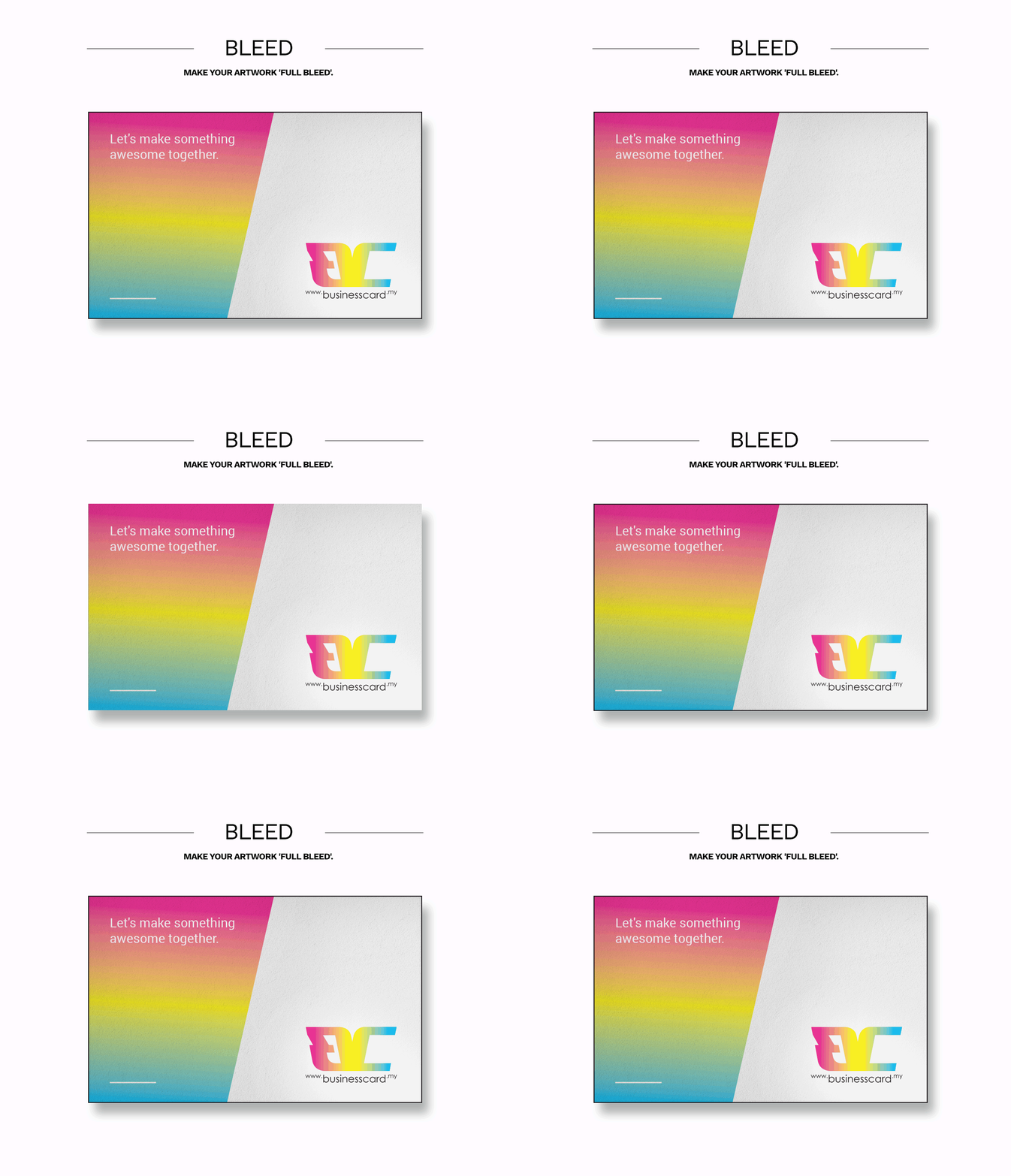
bleed

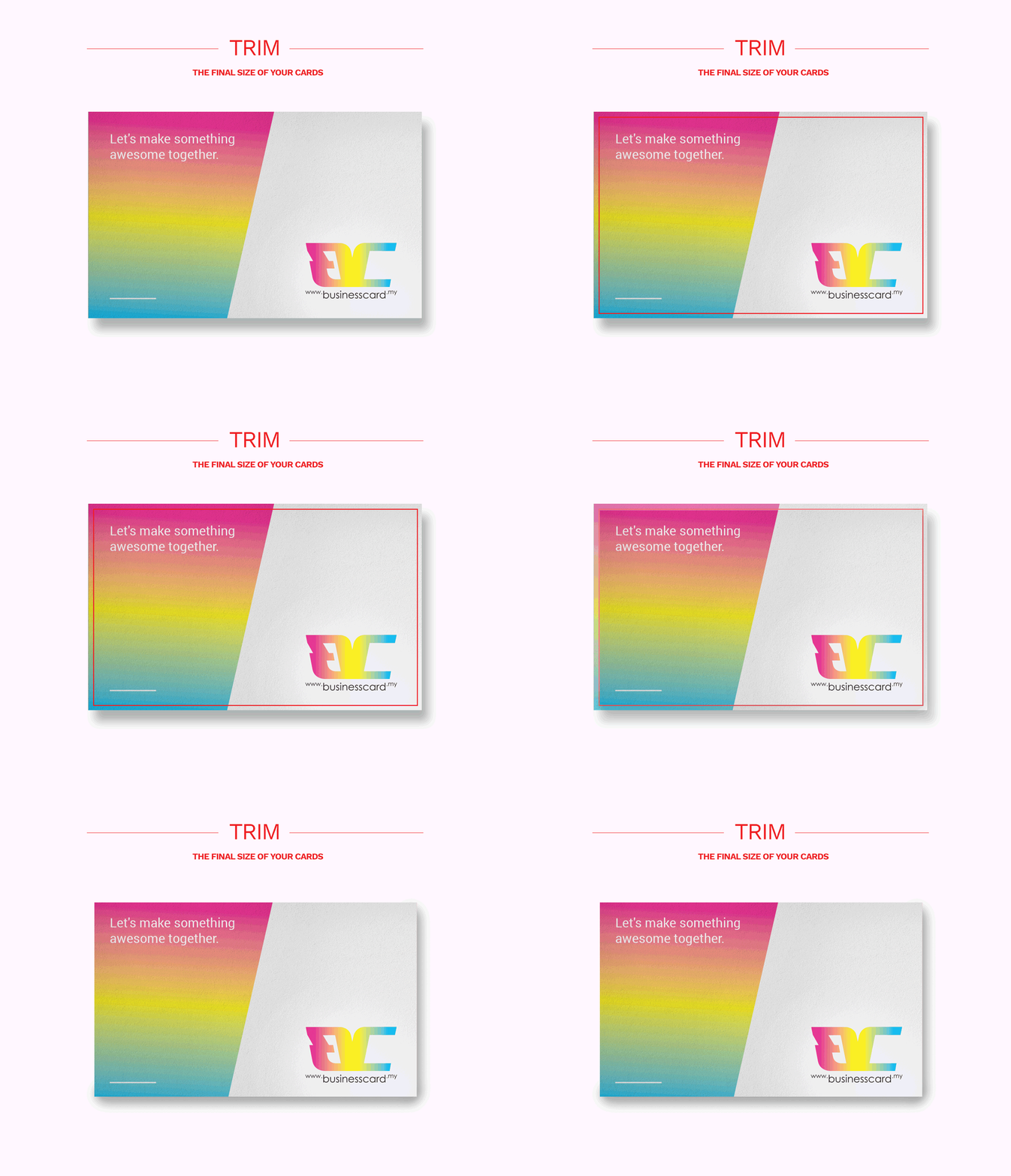
Trim

The trim is the final size of your cards after the bleed has been removed.Trim
Safe area

The safe area is an inner boundary within the trim area. It is smaller than the final card size and keeps essential elements away from the edges, reducing the risk of being cut off during trimming process. Place your most important information and design elements within this area to ensure they remain intact.
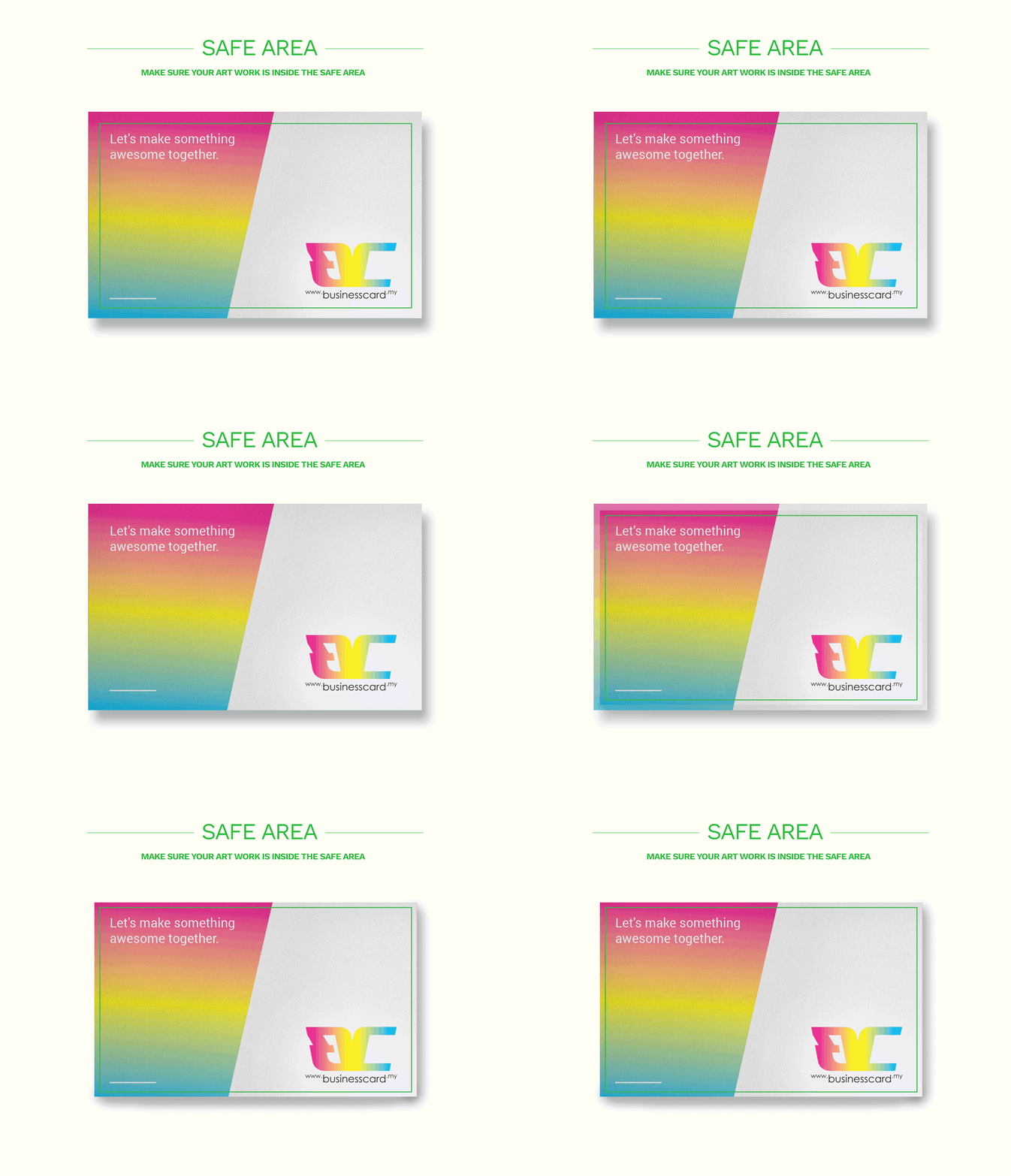
safe area

What does “create outline” mean?

In Adobe Illustrator, ‘create outline’ refers to converting your text into shapes, ensuring that the fonts are preserved and appear correctly, even if the original font is not available.

Why is my image missing in the AI file?

To prevent missing images, please make sure to embed all images in your design file before sending it to us.

What should I consider when adding a QR code to my business card design?

When adding a QR code, ensure it is high-resolution with sufficient contrast against the background for easy scanning. The QR code size should be large enough to be easily scanned.

Based on our tests at BCMY:
a) The required QR code size depends on its type. For example, vCard QR codes are more complex and require a larger size.
b) Scanning ability varies by device. High-end phones like the iPhone 15 and Samsung Galaxy S23 can scan QR codes as small as 9mm x 9mm, while older or lower-end devices may need a minimum size of 15mm x 15mm for the same code.

We highly recommend printing the business card design at actual size and testing the QR code’s scannability before proceeding with printing.

Can I change my design after confirmation?

We strive to meet our lead time commitments, so once the final confirmation is given, your order is processed immediately, and no further changes can be made. Therefore, we strongly recommend reviewing your design thoroughly before confirming with us.

Will the colors I see on my computer screen be the same as those in the printed card?

The colors on your computer screen may differ from those in the printed card due to the different color models used. Screens display colors in RGB (Red, Green, Blue), which can produce more vibrant hues, while printed materials use CMYK (Cyan, Magenta, Yellow, Black), which may not replicate all RGB colors accurately, especially blues and greens. To minimize discrepancies, design in CMYK format and consult color swatches for better color matching.

Does “what you design is what prints” apply to files I supply?

That promise is specific to the BCMY Designer, where your card is rendered from the same file that goes to press.

If you supply your own artwork, we print exactly what you send — and we check it before printing. If we spot something that will not print well, we tell you before we run it, not after.

Order & Payment

What should I do before making payment?

Before making your payment, ensure that the uploaded file is high-resolution for printing. Low-resolution files can result in blurry printed outcomes. Avoid uploading sample images from the web or photos taken with a camera, as these are not suitable for printing. A print-ready file is essential for the best results. Please note that additional charges may apply if you require our artwork recreation or business card design services.

Contact us via WhatsApp
https://wa.me/60162632273

What payment methods do you accept?

Below are the payment available,
Credit Cards (Visa & Master)
Duitnow (Malaysia e-wallets: TNG E-wallet, GrabPay, Boost, MAE etc.)

Bank transfer to:
Account name : AEIOU INTERNATIONAL SDN BHD
Bank account no : 3214 1511 29 (Public Bank)

Please email / WhatsApp us a the payment slip as proof of payment.
You may email us at : [email protected]
WhatsApp: https://wa.me/60162632273

Will I receive a refund if I overpay?

Please pay the exact amount. Any overpaid balance will not be refunded but will be kept as credit for future orders.

I’m having trouble paying for my order, what can I do?

Sorry about that. You may proceed to contact us directly at our online enquiry form or call us. Please refer to our ‘Contact Us’ section for more details.

Do you take ‘Rush Order’?

For ‘Rush Order’, please contact us for more information. Other than that, you can consider digital offset printing as another option for faster printing turn around.

Do you offer credit terms?

We do not offer credit terms. Printing starts once payment is received.

My order arrived but it’s not at all what I expected. What can I do?

Contact us, let us know the order number and what the problem is. If we can fix it, we will.

I want to cancel my order

You can cancel your order. But there is No refund on canceled order. If you’re looking to cancel certain items from your order, please contact us and we’ll do our best to help.

How do I get an invoice/receipt for my order?

When you have completed your payment, we’ll provide a link to download an official invoice/receipt for your order. If you missed it at checkout, you can contact us or email us. We’ll do our best to help you.

When do I approve my card before printing?

Designed in the BCMY Designer? Your design is approved when you proceed to checkout — the exact artwork you approved is carried into your order.

Sending us your own file? We send you a digital proof, and printing starts only once you approve it.

Proofs are digital. We do not send physical or hard-copy proofs.

Delivery & Pickup

Where is businesscard.my located?

Our office is located at Damansara Uptown, Petaling Jaya, Malaysia.

Can I collect my order at businesscard.my office?

You may do self-pickup at our office in Damansara Uptown, Petaling Jaya, Malaysia. Please contact us to arrange for collection time to avoid any inconveniences.

If I’m not at home, what other option available to receive my order?

Local delivery agent may require a signature from you. If you work during the day, the best solution is to provide us your working places address so that we can deliver to you immediately.

I wish to deliver my order to different places.

Separate delivery fees are applicable for every different delivery destination requested.

What day will businesscard.my send out their order?

Business card will be ship out after the production lead time. Standard local shipping time is 1 – 2 days depending on courier service day. For International shipping time, kindly please refer to us by e-mail at [email protected]

Please note that all production lead time times are in working days only (Mon-Fri, excluding Saturday, Sunday & Public Holidays). Kindly please take note of the different Type of Business Card order will have a different production lead time.

Shipping date in our system is estimation only, it may change due to uncontrollable circumstances such as courier delay, artwork rejection or printing machine maintenance/breakdown.

How much does postage/delivery cost?

West Malaysia: Free Shipping
Sabah & Sarawak : Free Shipping (By Pos Flexi)

For International Shipping kindly please refer to us at [email protected]

File Requirements

Software

The recommended software for you to use are Adobe Illustrator, Adobe Photoshop and Adobe InDesign. Please note that we require at least Creative Suit 4 (CS4) and above. Any other image editing software can be use as long as it able to set our required specifications.

Colours, Image Format, Resolution & Typography

Color
Images from digital cameras by default are set to RGB colours. In order to maintain the printing quality, we would suggest converting the image or graphic into CMYK base colours. This is because CMYK is commonly used for high quality printing purpose and gives the final print a more realistic view. You may also need to adjust color level, brightness and contrast of your image or graphic to suit your preferences.

Image Format
The standard format for graphic or image required is JPEG, PDF or PNG file type. Images from digital cameras are by default in JPEG format.

Size/Resolution
The most important part of image and graphic will be the size or resolution of the image. If the resolution is too low, when enlarging for prints, the image may be pixelated. Our minimum requirement is 300dpi.

Typography
For typography, please ensure that the text size required is at least at 6pt. It is recommended for you to create outline with at least 0.5pt and above thickness for your text. This is to prevent the text from blurry and unclear after the final print.

If you are uncertain or unclear of the requirement and guideline, please do not hesitate to contact us for assistance and clarification.

Tagging System

Eco-Conscious Tagging System

Eco-Conscious Business Cards: Choosing Sustainability with Every Handshake

Sustainability is a crucial responsibility that everyone should embrace. As businesses evolve to become more environmentally conscious, even the smallest details, like business cards, can make a significant impact. That’s why we’ve introduced an intuitive eco-tagging system to help you make informed choices when selecting the perfect business card that aligns with your sustainability values.

Leaf Rating System: A Greener Future in Your Hands

Green Choice (1 Leaf) – Pure & Simple

Business cards with this tag are made from homogeneous card material, free from lamination or oil-based coatings. This means they are 100% recyclable and free from plastic elements, making them a great choice for minimal environmental impact. If you’re looking for a straightforward, eco-conscious option that remains professional and sleek, this is your go-to.

?? Sustainable Certified (2 Leaves) – Ethically Sourced

These business cards are made from materials certified by FSC (Forest Stewardship Council) or PEFC (Programme for the Endorsement of Forest Certification). This means the paper pulp used in these cards comes from responsibly managed forests that prioritize sustainability, biodiversity, and ethical sourcing. Opting for this choice supports forest conservation and responsible production processes.

??? Zero Waste (3 Leaves) – 100% Recycled

The ultimate eco-friendly choice, these business cards are crafted from 100% recycled materials such as post-consumer paper waste or wood-free alternatives. This selection ensures minimal environmental impact by reducing waste, conserving natural resources, and promoting a circular economy. If sustainability is at the heart of your business, these cards reflect your commitment to a greener planet.

Making Every Card Count

Choosing an eco-friendly business card isn’t just about reducing waste—it’s about making a statement. With our leaf-tagging system, you can easily find the best option that aligns with your values while ensuring your brand remains impactful and professional.

Join us in making a difference — start with a sustainable business card choice!

Thickness Tagging System

Business Card Thickness: Finding the Perfect Fit for Your Needs

A business card is more than just a piece of paper — it’s an extension of your brand and personality. Choosing the right thickness ensures that your card not only looks good but also serves its purpose effectively. To help you decide, we’ve introduced a simple thickness-tagging system to match your preferences and professional needs.

Thickness Rating System: The Right Balance of Style & Function

? Thin (Less than 0.25mm) – Light & Practical

Thin business cards are perfect for individuals who prefer a minimalist, lightweight option. Their slim profile allows you to carry more cards in a compact name card box, making them ideal for those who network frequently and need to keep a high volume on hand. If you favor practicality over rigidity, this is the perfect choice for you.

? Standard (0.25mm – 0.40mm) – Classic & Versatile

A balanced option, standard business cards provide a sturdy feel without being too bulky. This is the go-to thickness for most professionals, offering a refined look while remaining easy to store and distribute. If you’re looking for the perfect blend of durability and flexibility, this is your best bet.

? Thick (0.40mm – 0.60mm) – Premium & Lasting Impact

For those who want to leave a lasting impression, thick business cards provide a luxurious feel and substantial weight. They convey prestige and quality, making them ideal for high-end brands, executives, and individuals who want their business card to stand out. If durability and exclusivity are your priorities, this is the ultimate choice.

? Ultra Thick (0.60mm onwards) – Bold & Elegant

For those seeking the pinnacle of sophistication, ultra-thick business cards offer unmatched durability and a premium feel. These cards are ideal for blind deboss effects (letterpress), adding a tactile depth that enhances your brand’s visual and physical presence. Perfect for luxury brands and professionals who want their business cards to feel as impressive as they look.

Choosing the Best Fit for Your Brand

Your business card says a lot about you—whether you prioritize practicality, tradition, or luxury. With our thickness-tagging system, you can effortlessly choose a card that aligns with your brand’s identity and personal style.

No matter your choice, a well-crafted business card is a powerful tool in making memorable connections. What will yours say about you?

Water Resistance Tagging System

Water Resistance Rating System: Protection Against the Elements

Non-Water Resistant – Absorbent & Natural

Business cards in this category are made from homogeneous card materials. Without additional coatings, they retain a natural texture but absorb water easily. Ideal for those who prioritize eco-friendliness over water resistance.

Surface Water Resistant – Shielded Yet Vulnerable

Laminated business cards, including gloss, matte, and soft-touch laminated options, feature a thin plastic film that provides surface-level water resistance. While effective against splashes, water can still seep in from the edges over time.

Waterproof – Fully Protected & Durable

Crafted from durable PVC or plastic materials, waterproof business cards provide complete protection against moisture and spills. Designed for longevity, they maintain their pristine condition in any environment, reinforcing your brand’s dependability and quality. Ideal for outdoor professionals, hospitality businesses, or anyone who values resilience in their networking tools.

Printing

How long does it take to get my business card done?

Printing lead time will be depend on card finishing and material:

  • Normal printing business card will be 2-3 working days
  • Spot UV finishing will be 3-5 working days
  • Foil Stamping finishing will be 8-10 working days
  • Deboss/emboss process will be 8-10 working days
  • Die cut process will be 8-10 working days.
How long does printing take?

Please refer to the table below as a guide; all turnaround times are in working days only (Mon-Fri, excluding Public Holidays). This average turnaround time begins from the moment you confirm your artwork and payment has been made in full.

Can we print using our own paper?

We don’t practice this policy as in terms of printing services.We normally source our supplier.

What printing method do you use?

You are given an option to choose either high quality offset printing or digital printing presses for your own name card design. Both methods are using four-color ink process.

What format does businesscard.my recommended?

businesscard.my accept a range of different format such as Adobe AI, Adobe Photoshop, Adobe InDesign, JPEG, PNG and PDF. Find out more here, you will get more helpful tips in more complete format.

Can I print smaller quantity?

Minimum order quantities vary by product. Most business cards start from 200 pcs, while selected products start from 100 pcs. Check the available quantity options on the product page — each product lists its own minimum. Need a specific quantity? Message us and we will confirm what is possible for your stock and finish.

Can I split my minimum order into 2 or 3 set?

Your order covers one name / design at the quantity you selected (e.g. 300 pcs = 300 pcs of a single design). If you submit 2 or 3 different artworks, we can only proceed with one — each additional name or design needs its own order and must meet its own minimum. Printing several names or designs? Message us and we will help you set it up.

How long does each material and finishing take?

Lead time depends on the stock and the finishing. Standard cards are typically 3 working days; foil stamping, emboss, PVC and other special finishes take longer because they involve additional production steps.

Every product page states its own lead time before you order. If a job is urgent, tell us your deadline and we will tell you honestly whether we can meet it.

Finishing

What is finishing?

Finishing is another printing process of business card which able to “beautify” your business card. Different type of finishing could present the special effects on your business card.

What is thickest word to apply deboss process or foil stamping?

The wording line thickness must be more than 1.0pt but the thicker wording line produce nicer image.

Is it PVC Frosted can do both side printing?

We do not do both side printing for our standard Frosted Transparent PVC Card. However, you can contact us for custom job order if you need large quantity (300pcs and above).

Can I do edge color on my business card?

Yes, we do provide edge color services. Kindly please contact us for custom job quotation.

Is it possible to apply spot uv other than art card?

Yes — Spot UV can be applied to most of our card stocks. Kindly please contact us for custom job quotation.

Creative Design

How long does it take to receive a design proof.

Once you pay, you will receive a design proof in 1-4 days. Normally this is closer to 1-2 days, but we do allow more time for when we are much busier.

How does the process work?

It will start with submit a quote or card spec together with your own design to us, once we receive that from you, we will reply with cost, time frame, and how to pay.

Once you confirm, we will be put on the work list. We will then send you a proof of the artwork so you can make changes and double check for any spelling errors. Once you’re happy with the cards and has provide us the proof of payment, we send them to print.

Reorder & Account

Can I reorder my previous order before?

Yes, you can reorder your designs that have done before. The requirement is within 3 month of your previous order.

I want to change my deliver address

Yes you can. you may contact us or email us the details that you want to update.

I want to change my details

Yes you can. you may contact us or email us the details that you want to update. Leave your company name, new information details and namecard image (if available) so that it is more easy for us to find your previous file.

**Take Note that we would update details information part only. If your design are using special font, then we would apply the most suitable font typeface to replace your latest details only.

Still have a question?

We answer WhatsApp fastest during working hours, Monday to Friday, 9:00am–5:30pm.